How To Find Imei Number On Phone

Hey there, tech explorer! Ever felt like you're on a secret mission, trying to uncover the hidden identity of your trusty sidekick - your phone? Well, buckle up, because we're...

Hey there, tech explorer! Ever felt like you're on a secret mission, trying to uncover the hidden identity of your trusty sidekick - your phone? Well, buckle up, because we're about to embark on a fun little adventure to find the International Mobile Equipment Identity (IMEI) number of your device. Why, you ask? Because knowing your phone's IMEI can be a game-changer, helping you keep your device secure, track it if it goes missing, and even unlock a world of tech support possibilities.
Why Bother with the IMEI?
Imagine this: You're out and about, enjoying the day, when suddenly, your phone decides to take a little solo trip down the drain. Panic sets in, right? But wait! If you've got your phone's IMEI number tucked away safely, you can remotely wipe your data and block your SIM, keeping your personal info safe and sound. Plus, it's like your phone's fingerprint - no two are the same, making it super useful for tracking down your device if it goes MIA.
Let's Get Started!
Alright, enough with the suspense. Let's dive into the fun part - finding your phone's IMEI number. Don't worry, it's not like we're asking you to solve a complex math equation or something. Promise!
Must Read
For Android Users
If you're rocking an Android device, you've got a few easy-peasy methods to choose from. Ready?
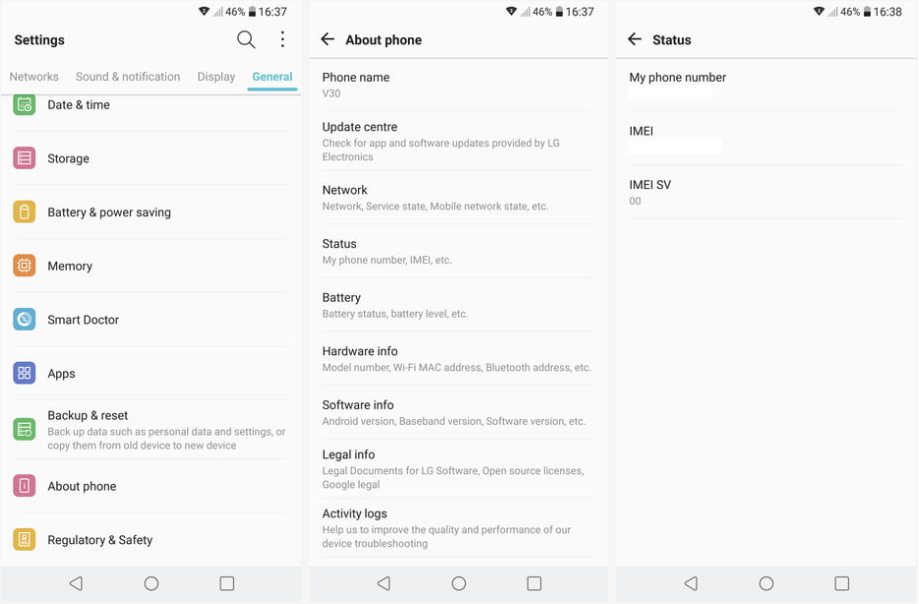 How To Find Your Phone's IMEI Number - Good Call
- Method 1: The Settings Route - Head over to your phone's Settings, then click on 'About phone' or 'About device'. Scroll down, and there it is - your IMEI number, waiting patiently for you.
- Method 2: The Dialer Trick - Feel like a secret agent yet? Here's another sneaky way to find your IMEI. Open your phone's dialer and type in *#06#. Voila! Your IMEI number should pop up on the screen like magic.
For iPhone Users
You iPhone enthusiasts aren't left out of the fun, of course! Here's how you can find your IMEI number in just a jiffy.
- The About Screen - Go to your phone's Settings, then tap on 'General' and scroll down to 'About'. There you'll find your IMEI number, right under 'IMEI/SERIAL NUMBER'.
What If You Can't Find It?
Don't stress if your phone's being a little shy about sharing its IMEI. If you've got an iPhone, you can find the number on the original box it came in, or by checking your Apple ID account settings. For Android users, you can try looking at the back of your device (some manufacturers print it there) or checking your phone's original packaging.
 How to find your IMEI number on Android | Ultra Mobile
Now That You've Found It...
Congratulations, you've just unlocked a secret superpower! With your phone's IMEI number safely stored, you're ready to face any tech challenge that comes your way. So go forth, explore, and enjoy the peace of mind that comes with knowing you've got your phone's back - and vice versa!
And hey, why stop at just your phone? Why not make a fun family activity out of finding the IMEI numbers of all your devices? It's like a real-life treasure hunt, but with way less sifting through sand. Who knows, you might even inspire your kids to become future tech geniuses! So get out there, have fun, and happy IMEI hunting!
